
Key Takeaways
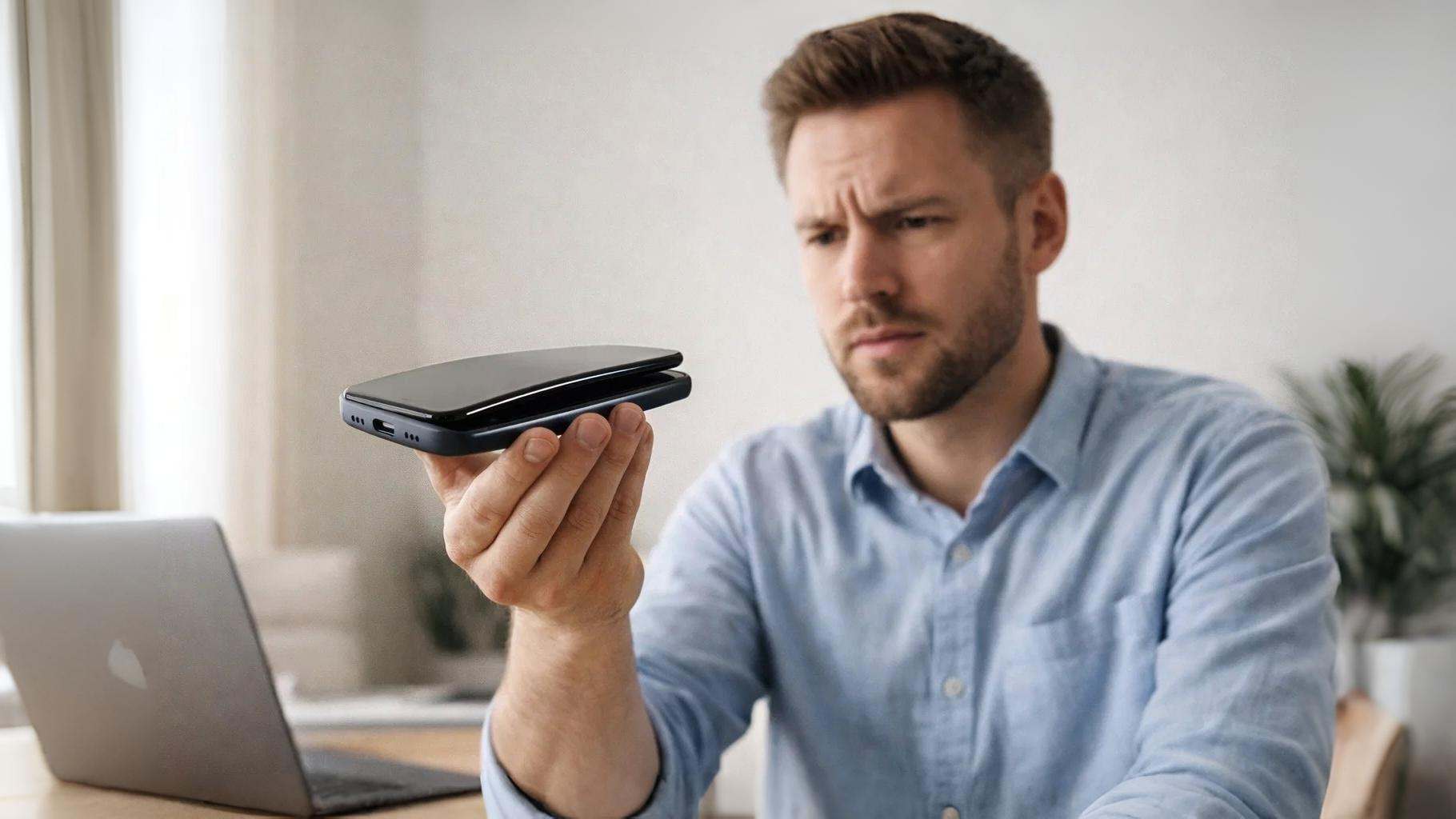
- Lithium-ion battery expansion creates physical deformation visible as screen separation or back panel bulging
- Heat exposure above 140°F accelerates chemical breakdown causing gas buildup inside sealed battery cells
- Stop using the device immediately when swelling detected prevents fire risk and further damage
- Specialized e-waste facilities handle swollen batteries while regular trash or recycling bins create serious hazards
- Manufacturer warranty often covers battery swelling within first 1-2 years depending on phone model
You pick up your phone and notice the screen has separated slightly from the frame, or the back cover no longer sits flush against the body. Phone battery swelling creates these visible warning signs that demand immediate attention, not because your phone looks damaged, but because the chemistry inside has become unstable.
This guide explains what phone battery swelling looks like, what causes a phone battery to swell, and how to dispose of phone with swollen battery safely. You’ll learn the specific dangers posed by swollen phone battery conditions and exactly what actions to take immediately.
By the end, you’ll know how to identify battery swelling early, understand why it happens, and handle the situation without putting yourself or others at risk.
Phone Battery Swelling and What It Looks Like When It Happens
Phone battery swelling produces several distinct visual and physical indicators that become progressively more obvious as the condition worsens. The most common sign is screen separation from the phone body, where the display no longer sits flush with the frame and you can see a gap along one or more edges. This happens because the expanding battery pushes outward from inside the phone’s chassis.
Back panel bulging represents another clear indicator, particularly noticeable in phones with glass or metal back covers. The battery expansion creates a visible hump or curve where the surface should be flat. Press gently on the back panel, if it feels spongy or bounces back like a drum, the battery has swollen significantly.
Difficulty closing cases or covers that previously fit normally suggests internal expansion. The phone may also feel warmer than usual during normal use or when sitting idle. Some devices develop issues with buttons not clicking properly or ports becoming misaligned as internal components shift from battery pressure.
After handling hundreds of device repairs over several years working in electronics diagnostics, I’ve found that most people ignore early swelling signs for weeks before recognizing the problem. The gap between screen and frame often starts at just 1-2mm-barely noticeable before progressing to obvious separation within days.
Screen discoloration or dead pixels appearing near battery location can indicate pressure against the display from below. In severe cases, you might hear slight creaking sounds when handling the device as internal components compress against the swollen battery.
What Causes a Phone Battery to Swell and Why It Happens to Phones
If you wonder what causes a phone battery to swell? It involves chemical processes inside lithium-ion battery cells that produce gas as a byproduct of degradation. Modern phone batteries contain lithium-ion or lithium-polymer cells with liquid or gel electrolyte separating positive and negative electrodes. When this electrolyte breaks down, it releases gases that accumulate inside the sealed battery pouch.
Heat exposure represents the primary trigger for battery swelling. Operating phones in temperatures above 95°F or leaving them in hot cars where interior temperatures reach 140°F+ accelerates electrolyte breakdown. Charging while using demanding apps generates additional heat that compounds the problem. According to research, lithium-ion batteries degrade twice as fast for every 18°F increase in operating temperature.
Physical damage from drops or impacts can puncture internal battery layers, causing immediate chemical reactions that produce gas. Manufacturing defects in some battery batches create internal shorts that generate excess heat and gas over time. Fast charging technology, while convenient, creates more internal resistance and heat than standard charging, contributing to faster degradation.
Age naturally causes phone battery swelling as batteries complete 300-500 charge cycles. Each charge-discharge cycle slightly degrades the internal chemistry. Most phone batteries reach end of life after 2-3 years of daily use, though swelling can occur sooner with poor charging habits or heat exposure.
Overcharging/leaving phones plugged in at 100% for extended periods-forces additional ions into the battery structure beyond optimal capacity, stressing internal components. Similarly, letting batteries drain to 0% repeatedly causes deep discharge stress that damages electrodes and electrolyte.
How to Dispose of Phone with Swollen Battery the Safe Way Fast
How to dispose of phone with swollen battery requires specialized handling because swollen cell phone battery units pose fire and chemical hazard risks that standard waste streams cannot accommodate. Never place swollen batteries in regular household trash, recycling bins, or any container where they might be crushed or punctured.
Immediate Isolation of Swollen Phone Battery
Power off the device completely and remove it from any charging cable. Store the phone in a cool, dry location away from flammable materials, a metal container or ceramic bowl works well. Do not place it in plastic bags or containers that could trap heat. Keep the device away from children, pets, and sleeping areas until proper disposal.
Finding Authorized E-Waste Disposal Facilities
Contact local electronics retailers like Best Buy, which operate battery recycling programs accepting swollen batteries at most US locations. Call ahead to confirm they accept damaged batteries, as some locations restrict severely swollen units. Search for certified e-waste facilities through Call2Recycle or local municipal hazardous waste programs.
Safe Transport to Disposal Location
Transport the device in a sturdy container that prevents movement and potential impact. Place it in the main cabin of your vehicle, not the trunk, so you can monitor for any changes. If the battery shows signs of venting (hissing sounds, unusual odors, or visible swelling), pull over safely and move the device to an open outdoor area away from the vehicle.
Manufacturer and Carrier Programs
Check whether your device falls under manufacturer warranty or recall programs. Apple, Samsung, and other major brands sometimes offer free battery replacement or device trade-in for swollen battery cases. Wireless carriers including Verizon, AT&T, and T-Mobile provide trade-in credits that offset replacement costs even for damaged devices.
Is a Swollen Phone Battery Dangerous and Can It Explode on You
Yes, a swollen phone battery poses genuine safety risks including fire, explosion, and release of toxic gases, though actual incidents remain relatively rare when handled properly. The swelling itself indicates internal chemical instability where flammable electrolyte has begun breaking down and producing gas under pressure.
The primary danger comes from rupture or puncture of the swollen battery casing. If the internal layers separate or the outer pouch tears, oxygen exposure causes the lithium compounds to ignite rapidly. This thermal runaway reaction reaches temperatures exceeding 1000°F within seconds, producing intense flames and toxic fumes containing hydrogen fluoride and other dangerous chemicals.
Explosion risk increases significantly if the battery suffers physical trauma while swollen. Dropping the phone, applying pressure trying to flatten the bulge, or attempting DIY battery removal can puncture the battery pouch and trigger immediate ignition. Continued charging of a swollen battery forces additional chemical reactions that build more gas pressure, increasing rupture likelihood.
According to data from the Consumer Product Safety Commission, lithium battery fires from phones and tablets cause dozens of residential fires annually in the US. However, most incidents involve batteries that were punctured, crushed, or improperly disposed of rather than simply left swollen but undisturbed.
The realistic risk assessment: A swollen battery sitting undisturbed in a cool environment poses minimal immediate danger. The risk escalates dramatically when the device continues normal use, charges, or experiences any physical stress. Proper handling eliminates most danger, while mishandling a swollen battery creates serious hazards.
What to Do If You Notice Your Phone Battery Swelling Right Away
Phone battery swelling demands immediate action following a specific safety protocol to prevent escalation from a manageable situation to a dangerous one.
- Stop using the device immediately: Power it off completely and disconnect from any charger or accessories. Continued use generates heat that accelerates swelling and increases fire risk.
- Do not attempt to “fix” the swelling: Never press on the bulge, try to puncture the battery to “release gas,” or attempt DIY battery replacement. Professional repair requires specialized tools and safety equipment.
- Isolate the phone from flammable materials: Place it on a non-flammable surface like metal, ceramic, or concrete, away from paper, fabrics, or other combustibles.
- Monitor but don’t obsess: Check the device once or twice daily for progression. If swelling increases rapidly or the battery begins venting (hissing, chemical smell, heat), move it outdoors immediately.
- Contact the manufacturer: Document the swelling with photos showing serial numbers and submit a warranty claim or support ticket within 24-48 hours. Many manufacturers replace batteries free within warranty periods.
Back up critical data before the situation worsens, though do this quickly if the phone still powers on. Use cloud services or wireless transfer rather than leaving it connected to computers for extended periods. Consider the device effectively retired attempting to salvage it after professional battery replacement often costs more than replacement phones.
Schedule e-waste disposal within 3-5 days maximum. The longer a swollen battery sits, even when not in use, the greater the risk of spontaneous failure. Most certified e-waste facilities accept walk-ins during business hours without appointments for battery disposal.
Conclusion
Phone battery swelling signals chemical instability that requires immediate action rather than continued use hoping the problem resolves itself. The visible signs are screen separation, back panel bulging, or device thickness changes which indicate internal processes that will only worsen with time and use.
Safe handling eliminates most danger associated with swollen batteries. Stop using the device, isolate it in a cool location, and arrange proper disposal through certified e-waste facilities within days of detection. Manufacturer warranty programs often cover battery replacement at no cost for devices under 2 years old.
Check your phone tonight for any signs of swelling using the visual indicators described above. If you notice anything unusual, power it off immediately and begin the disposal process tomorrow. Document the condition with photos, contact your phone manufacturer’s support line, and locate your nearest e-waste facility using the resources provided.
FAQs
What does phone battery swelling look like?
Phone battery swelling appears as visible gaps between the screen and phone frame, back panel bulging that creates a curve or hump, or difficulty closing protective cases that previously fit normally. The phone may feel thicker than usual and the screen might show discoloration where battery pressure applies force from below.
Can a swollen phone battery explode if I don’t use it?
A swollen phone battery can potentially rupture or catch fire even when not in active use, though risk remains low if stored properly in a cool location away from heat and physical stress. The danger increases dramatically if the battery continues swelling, gets punctured, or remains in high-temperature environments.
Why do phone batteries swell in the first place?
Why do phone batteries swell comes down to chemical degradation inside lithium-ion cells that produces gas as a byproduct. Heat exposure, physical damage, manufacturing defects, overcharging, and natural aging all accelerate the breakdown of internal electrolyte, causing gas accumulation that expands the sealed battery pouch.
How long does it take for a phone battery to swell?
Phone battery swelling develops over timeframes ranging from days to years depending on cause. Heat damage or physical trauma can produce visible swelling within 24-48 hours, while age-related degradation typically takes 2-3 years of daily use before swelling becomes noticeable.
Where can I dispose of a swollen cell phone battery safely?
Swollen cell phone battery disposal requires authorized e-waste facilities, battery recycling programs at retailers like Best Buy, or municipal hazardous waste collection events. Contact Call2Recycle to locate the nearest certified drop-off location that accepts damaged lithium batteries.